Benro Connect1.5.1
Publisher Description

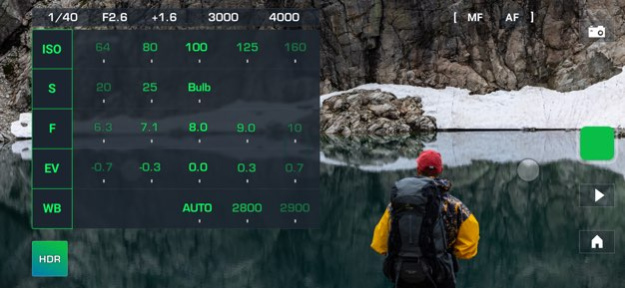


Benro Connect is designed to control the Polaris Smart Electric Tripod Head and Theta Smart Modules, delivering an uparalleled experience in long-distance photography.
[Polaris Smart Electric Tripod Head]
With the app connected to Polaris, you can remotely control the shooting angle and preview your shots in real-time on your mobile device via Wi-Fi or cellular networks, offering great flexibility. The app supports various programmable shooting modes such as time-lapse, panoramic shooting, and sunrise/sunset time-lapse. Additionally, when paired with the optional Astro kit, Polaris can be transformed into a professional equatorial mount, allowing you to easily capture stars using the GoTo feature and automatically track stars for long-exposure shots without star trails.
[Fine-Tuning and Remote Control]
By wirelessly connecting the app with Battery Module and Camera Control Module, you can not only fine-tune the leveling but also achieve precise remote camera control, including live view, parameter adjustments, and media file management, making the shooting process more efficient and flexible.
[Holy Grail Time-Lapse Shooting]
By wirelessly connecting the app with Battery Module, Camera Control and Optical Sensor Module, enabling real-time ambient light detection. The Camera Control Module can then combine sensor input with advanced algorithms to dynamically adjust exposure settings, ensuring smooth transitions from day to night (and vice versa) for Holy Grail time-lapse photography.
[Live Streaming]
By wirelessly connecting the app to Battery Module and GoLive Module, you can easily enable real-time live streaming.
Version History This update announces that the Benro Polaris app has officially been renamed to Benro Connect. Along with a redesigned homepage, both Polaris and Theta smart module features are now integrated into the Benro Connect app. Here's an overview of the key updates:
I. Theta Smart Module Software Features
Notice: These features require the use of Theta Battery Module.
1. Pairing with Theta Battery Module and GoLive Module enables live streaming.
2. Pairing with Theta Battery Module and Camera Control Module enables fine-tuned leveling and remote camera control shooting.
3. Pairing with Theta Battery Module, Camera Control Module, and Optical Sensor Module enables the Holy Grail shooting.
II. Polaris Updates and Optimizations
Notice: This verison requires Polaris firmware > =6.0.0.48, update App to this verision before Polaris firmware update.
1. Added Optical Sensor Module control in Polaris' Holy Grail mode, allowing for dynamic exposure adjustments.
2. Added a new pause function for Panoramic Shooting in Polaris.
3. Improved Polaris' Focus Stacking mode for enhanced performance. 1.5.1 10/01/2024 This update announces that the Benro Polaris app has officially been renamed to Benro Connect. Along with a redesigned homepage, both Polaris and Theta smart module features are now integrated into the Benro Connect app. Here's an overview of the key updates:
I. Theta Smart Module Software Features
Notice: These features require the use of Theta Battery Module.
1. Pairing with Theta Battery Module and GoLive Module enables live streaming.
2. Pairing with Theta Battery Module and Camera Control Module enables fine-tuned leveling and remote camera control shooting.
3. Pairing with Theta Battery Module, Camera Control Module, and Optical Sensor Module enables the Holy Grail shooting.
II. Polaris Updates and Optimizations
Notice: This verison requires Polaris firmware > =6.0.0.48, update App to this verision before Polaris firmware update.
1. Added Optical Sensor Module control in Polaris' Holy Grail mode, allowing for dynamic exposure adjustments.
2. Added a new pause function for Panoramic Shooting in Polaris.
3. Improved Polaris' Focus Stacking mode for enhanced performance. 1.5.0 09/29/2024 This update announces that the Benro Polaris app has officially been renamed to Benro Connect. Along with a redesigned homepage, both Polaris and Theta smart module features are now integrated into the Benro Connect app. Here's an overview of the key updates:
I. Theta Smart Module Software Features
Notice: These features require the use of Theta Battery Module.
1. Pairing with Theta Battery Module and GoLive Module enables live streaming.
2. Pairing with Theta Battery Module and Camera Control Module enables fine-tuned leveling and remote camera control shooting.
3. Pairing with Theta Battery Module, Camera Control Module, and Optical Sensor Module enables the Holy Grail shooting.
II. Polaris Updates and Optimizations
Notice: This verison requires Polaris firmware > =6.0.0.48, update App to this verision before Polaris firmware update.
1. Added Optical Sensor Module control in Polaris' Holy Grail mode, allowing for dynamic exposure adjustments.
2. Added a new pause function for Panoramic Shooting in Polaris.
3. Improved Polaris' Focus Stacking mode for enhanced performance. 1.4.6 09/29/2024 1.Add Holy Grail shooting mode.
2.Optimize the setting of time-lapse interval.
3.Fix some known bugs and improve user experience. 1.4.4 06/07/2023 Polaris Today’s update:
1. Added automatic level function
2. Fix known bugs 1.3.9 03/04/2023 1.Increase the automatic level;
2.Fix Known issues; 1.3.8 03/02/2023 1.Fix Known issues; 1.3.7 02/07/2023 1.Add automatic shutdown function without operation;
2.Fix Known issues; 1.3.6 01/10/2023 1.Fix Known issues 1.3.5 12/07/2022 1. Added astro search history
2. Optimized lunar tracking algorithm to improve tracking accuracy
3. Fixed known issues 1.3.4 11/29/2022 1. Optimize Free-Programming mode
2. UI optimization
3. Fixed known bugs 1.3.3 10/15/2022 1. Added Pano Pro feature in Astro mode
2. Add 720 Pano feature in Pano mode
3. Added Vertical Shooting function in Astro Mode
4. Fixed known bugs 1.3.2 09/13/2022 1. Added a quick switch between Shutter Mode and USB mode
2. Added a live preview orientation switch for vertical shooting
3. Optimized the time interval for timelapse
4. Open rotation restrictions for the ground angle shooting
5. Fixed known bugs 1.3.1 08/27/2022 1. Implemented shuttle cable mode
2. Implemented subdivision scale in Pano
3. Media library optimization
4. Homepage interface updated
5. Fixed known bugs 1.3.0 08/13/2022 1. Added Burst Mode to the Shooting Mode
2. Added Shutter Response Time for Pano Mode (including Astro Pano)
3. Added preview feature in Path-lapse Mode
4. Optimized GPS obtaining method in the poor signal area
5. Optimized Media Library downloading icon
6. Fixed known bugs 1.2.9 07/30/2022 Notice: this version require Polaris firmware > = 6.0.0.14, update app to this version before Polaris firmware update.
1. Support starry sky Dithering function
2. Support save camera parameters
3. Support save panorama setting parameters
4. Support manual input of GPS information
5. Optimize starry sky, track delay, panorama
6. Fix known issues 1.2.8 07/21/2022 Notice: this version require Polaris firmware > = 6.0.0.14, update app to this version before Polaris firmware update.
1. Support starry sky Dithering function
2. Support save camera parameters
3. Support save panorama setting parameters
4. Support manual input of GPS information
5. Optimize starry sky, track delay, panorama
6. Fix known issues 1.2.7 07/18/2022 Notice: this version require Polaris firmware > = 6.0.0.14, update app to this version before Polaris firmware update.
1. Support starry sky Dithering function
2. Support save camera parameters
3. Support save panorama setting parameters
4. Support manual input of GPS information
5. Optimize starry sky, track delay, panorama
6. Fix known issues 1.2.6 07/16/2022 Notice: this version require Polaris firmware > = 6.0.0.8, update app to this version before Polaris firmware update.
1. Support joystick speed gear
2. Support starry sky stack panorama
3. Support position display in astro mode (azimuth / altitude)
4. Support custom celestial objects in astro mode (ra/dec)
5. Fix known issues 1.2.5 06/23/2022 Notice: this version require Polaris firmware > = 6.0.0.8, update app to this version before Polaris firmware update.
1. 4G supports APN setting
2. Add preview grid
3. Optimize panorama and astro mode
4. Fix known bugs 1.2.4 06/02/2022 Notice: this version require Polaris firmware > = 6.0.0.5, update app to this version before Polaris firmware update.
1. Added support for 4G version of Polaris
2. Add support camera preview switch
3. Add support video recording function
4. Add support panorama in astro mode
5. Fix known bugs 1.2.2 05/16/2022 Notice: this version require Polaris firmware > = 6.0.0.5, update app to this version before Polaris firmware update.
1. Added support for 4G version of Polaris
2. Add support camera preview switch
3. Add support video recording function
4. Add support panorama in astro mode
5. Fix known bugs 1.2.1 05/01/2022 Notice: this version require Polaris firmware > = 5.0.0.10, update app to this version before Polaris firmware update.
1. Optimized Path-Lapse Function
2. Added Focus Peaking Function
3. Added People Remover Function
4. Fixed known bugs 1.1.7 04/13/2022 Notice: this version require Polaris firmware > = 5.0.0.10, update app to this version before Polaris firmware update.
1. Optimized Path-Lapse Function
2. Added Focus Peaking Function
3. Added People Remover Function
4. Fixed known bugs 1.1.6 04/04/2022 1. Solve known problems. 1.1.5 03/12/2022
About Benro Connect
The company that develops Benro Connect is Benro Image Technology Industrial Co., Ltd.. The latest version released by its developer is 1.5.1.
To install Benro Connect on your iOS device, just click the green Continue To App button above to start the installation process. The app is listed on our website since 2026-10-14 and was downloaded 2 times. We have already checked if the download link is safe, however for your own protection we recommend that you scan the downloaded app with your antivirus. Your antivirus may detect the Benro Connect as malware if the download link is broken.
How to install Benro Connect on your iOS device:
- Click on the Continue To App button on our website. This will redirect you to the App Store.
- Once the Benro Connect is shown in the iTunes listing of your iOS device, you can start its download and installation. Tap on the GET button to the right of the app to start downloading it.
- If you are not logged-in the iOS appstore app, you'll be prompted for your your Apple ID and/or password.
- After Benro Connect is downloaded, you'll see an INSTALL button to the right. Tap on it to start the actual installation of the iOS app.
- Once installation is finished you can tap on the OPEN button to start it. Its icon will also be added to your device home screen.
Program Details
System requirements
Download information
Pricing
Version History
version 1.5.1
posted on 2026-10-14
Version History This update announces that the Benro Polaris app has officially been renamed to Benro Connect. Along with a redesigned homepage, both Polaris and Theta smart module features are now integrated into the Benro Connect app. Here's an overview of the key updates:
I. Theta Smart Module Software Features
Notice: These features require the use of Theta Battery Module.
1. Pairing with Theta Battery Module and GoLive Module enables live streaming.
2. Pairing with Theta Battery Module and Camera Control Module enables fine-tuned leveling and remote camera control shooting.
3. Pairing with Theta Battery Module, Camera Control Module, and Optical Sensor Module enables the Holy Grail shooting.
II. Polaris Updates and Optimizations
Notice: This verison requires Polaris firmware > =6.0.0.48, update App to this verision before Polaris firmware update.
1. Added Optical Sensor Module control in Polaris' Holy Grail mode, allowing for dynamic exposure adjustments.
2. Added a new pause function for Panoramic Shooting in Polaris.
3. Improved Polaris' Focus Stacking mode for enhanced performance. 1.5.1 10/01/2024 This update announces that the Benro Polaris app has officially been renamed to Benro Connect. Along with a redesigned homepage, both Polaris and Theta smart module features are now integrated into the Benro Connect app. Here's an overview of the key updates:
I. Theta Smart Module Software Features
Notice: These features require the use of Theta Battery Module.
1. Pairing with Theta Battery Module and GoLive Module enables live streaming.
2. Pairing with Theta Battery Module and Camera Control Module enables fine-tuned leveling and remote camera control shooting.
3. Pairing with Theta Battery Module, Camera Control Module, and Optical Sensor Module enables the Holy Grail shooting.
II. Polaris Updates and Optimizations
Notice: This verison requires Polaris firmware > =6.0.0.48, update App to this verision before Polaris firmware update.
1. Added Optical Sensor Module control in Polaris' Holy Grail mode, allowing for dynamic exposure adjustments.
2. Added a new pause function for Panoramic Shooting in Polaris.
3. Improved Polaris' Focus Stacking mode for enhanced performance. 1.5.0 09/29/2024 This update announces that the Benro Polaris app has officially been renamed to Benro Connect. Along with a redesigned homepage, both Polaris and Theta smart module features are now integrated into the Benro Connect app. Here's an overview of the key updates:
I. Theta Smart Module Software Features
Notice: These features require the use of Theta Battery Module.
1. Pairing with Theta Battery Module and GoLive Module enables live streaming.
2. Pairing with Theta Battery Module and Camera Control Module enables fine-tuned leveling and remote camera control shooting.
3. Pairing with Theta Battery Module, Camera Control Module, and Optical Sensor Module enables the Holy Grail shooting.
II. Polaris Updates and Optimizations
Notice: This verison requires Polaris firmware > =6.0.0.48, update App to this verision before Polaris firmware update.
1. Added Optical Sensor Module control in Polaris' Holy Grail mode, allowing for dynamic exposure adjustments.
2. Added a new pause function for Panoramic Shooting in Polaris.
3. Improved Polaris' Focus Stacking mode for enhanced performance. 1.4.6 09/29/2024 1.Add Holy Grail shooting mode.
2.Optimize the setting of time-lapse interval.
3.Fix some known bugs and improve user experience. 1.4.4 06/07/2023 Polaris Today’s update:
1. Added automatic level function
2. Fix known bugs 1.3.9 03/04/2023 1.Increase the automatic level;
2.Fix Known issues; 1.3.8 03/02/2023 1.Fix Known issues; 1.3.7 02/07/2023 1.Add automatic shutdown function without operation;
2.Fix Known issues; 1.3.6 01/10/2023 1.Fix Known issues 1.3.5 12/07/2022 1. Added astro search history
2. Optimized lunar tracking algorithm to improve tracking accuracy
3. Fixed known issues 1.3.4 11/29/2022 1. Optimize Free-Programming mode
2. UI optimization
3. Fixed known bugs 1.3.3 10/15/2022 1. Added Pano Pro feature in Astro mode
2. Add 720 Pano feature in Pano mode
3. Added Vertical Shooting function in Astro Mode
4. Fixed known bugs 1.3.2 09/13/2022 1. Added a quick switch between Shutter Mode and USB mode
2. Added a live preview orientation switch for vertical shooting
3. Optimized the time interval for timelapse
4. Open rotation restrictions for the ground angle shooting
5. Fixed known bugs 1.3.1 08/27/2022 1. Implemented shuttle cable mode
2. Implemented subdivision scale in Pano
3. Media library optimization
4. Homepage interface updated
5. Fixed known bugs 1.3.0 08/13/2022 1. Added Burst Mode to the Shooting Mode
2. Added Shutter Response Time for Pano Mode (including Astro Pano)
3. Added preview feature in Path-lapse Mode
4. Optimized GPS obtaining method in the poor signal area
5. Optimized Media Library downloading icon
6. Fixed known bugs 1.2.9 07/30/2022 Notice: this version require Polaris firmware > = 6.0.0.14, update app to this version before Polaris firmware update.
1. Support starry sky Dithering function
2. Support save camera parameters
3. Support save panorama setting parameters
4. Support manual input of GPS information
5. Optimize starry sky, track delay, panorama
6. Fix known issues 1.2.8 07/21/2022 Notice: this version require Polaris firmware > = 6.0.0.14, update app to this version before Polaris firmware update.
1. Support starry sky Dithering function
2. Support save camera parameters
3. Support save panorama setting parameters
4. Support manual input of GPS information
5. Optimize starry sky, track delay, panorama
6. Fix known issues 1.2.7 07/18/2022 Notice: this version require Polaris firmware > = 6.0.0.14, update app to this version before Polaris firmware update.
1. Support starry sky Dithering function
2. Support save camera parameters
3. Support save panorama setting parameters
4. Support manual input of GPS information
5. Optimize starry sky, track delay, panorama
6. Fix known issues 1.2.6 07/16/2022 Notice: this version require Polaris firmware > = 6.0.0.8, update app to this version before Polaris firmware update.
1. Support joystick speed gear
2. Support starry sky stack panorama
3. Support position display in astro mode (azimuth / altitude)
4. Support custom celestial objects in astro mode (ra/dec)
5. Fix known issues 1.2.5 06/23/2022 Notice: this version require Polaris firmware > = 6.0.0.8, update app to this version before Polaris firmware update.
1. 4G supports APN setting
2. Add preview grid
3. Optimize panorama and astro mode
4. Fix known bugs 1.2.4 06/02/2022 Notice: this version require Polaris firmware > = 6.0.0.5, update app to this version before Polaris firmware update.
1. Added support for 4G version of Polaris
2. Add support camera preview switch
3. Add support video recording function
4. Add support panorama in astro mode
5. Fix known bugs 1.2.2 05/16/2022 Notice: this version require Polaris firmware > = 6.0.0.5, update app to this version before Polaris firmware update.
1. Added support for 4G version of Polaris
2. Add support camera preview switch
3. Add support video recording function
4. Add support panorama in astro mode
5. Fix known bugs 1.2.1 05/01/2022 Notice: this version require Polaris firmware > = 5.0.0.10, update app to this version before Polaris firmware update.
1. Optimized Path-Lapse Function
2. Added Focus Peaking Function
3. Added People Remover Function
4. Fixed known bugs 1.1.7 04/13/2022 Notice: this version require Polaris firmware > = 5.0.0.10, update app to this version before Polaris firmware update.
1. Optimized Path-Lapse Function
2. Added Focus Peaking Function
3. Added People Remover Function
4. Fixed known bugs 1.1.6 04/04/2022 1. Solve known problems. 1.1.5 03/12/2022
version 1.5.1
posted on 2024-10-01
Oct 1, 2024
Version 1.5.1
This update announces that the Benro Polaris app has officially been renamed to Benro Connect. Along with a redesigned homepage, both Polaris and Theta smart module features are now integrated into the Benro Connect app. Here's an overview of the key updates:
I. Theta Smart Module Software Features
Notice: These features require the use of Theta Battery Module.
1. Pairing with Theta Battery Module and GoLive Module enables live streaming.
2. Pairing with Theta Battery Module and Camera Control Module enables fine-tuned leveling and remote camera control shooting.
3. Pairing with Theta Battery Module, Camera Control Module, and Optical Sensor Module enables the Holy Grail shooting.
II. Polaris Updates and Optimizations
Notice: This verison requires Polaris firmware > =6.0.0.48, update App to this verision before Polaris firmware update.
1. Added Optical Sensor Module control in Polaris' Holy Grail mode, allowing for dynamic exposure adjustments.
2. Added a new pause function for Panoramic Shooting in Polaris.
3. Improved Polaris' Focus Stacking mode for enhanced performance.
version 1.5.1
posted on 2024-10-01
This update announces that the Benro Polaris app has officially been renamed to Benro Connect. Along with a redesigned homepage, both Polaris and Theta smart module features are now integrated into the Benro Connect app. Here's an overview of the key updates:
I. Theta Smart Module Software Features
Notice: These features require the use of Theta Battery Module.
1. Pairing with Theta Battery Module and GoLive Module enables live streaming.
2. Pairing with Theta Battery Module and Camera Control Module enables fine-tuned leveling and remote camera control shooting.
3. Pairing with Theta Battery Module, Camera Control Module, and Optical Sensor Module enables the Holy Grail shooting.
II. Polaris Updates and Optimizations
Notice: This verison requires Polaris firmware > =6.0.0.48, update App to this verision before Polaris firmware update.
1. Added Optical Sensor Module control in Polaris' Holy Grail mode, allowing for dynamic exposure adjustments.
2. Added a new pause function for Panoramic Shooting in Polaris.
3. Improved Polaris' Focus Stacking mode for enhanced performance.
version 1.4.4
posted on 2023-06-07
Jun 7, 2023
Version 1.4.4
1.Add Holy Grail shooting mode.
2.Optimize the setting of time-lapse interval.
3.Fix some known bugs and improve user experience.
version 1.3.9
posted on 2023-03-04
Mar 4, 2023
Version 1.3.9
Polaris Today’s update:
1. Added automatic level function
2. Fix known bugs
version 1.3.0
posted on 2022-08-13
Aug 13, 2022 Version 1.3.0
1. Implemented shuttle cable mode
2. Implemented subdivision scale in Pano
3. Media library optimization
4. Homepage interface updated
5. Fixed known bugs
